TL;DR
- There is no single price for a Salesforce to HubSpot migration. The cost depends on data volume, custom objects, field mapping, workflows, integrations, and the migration method you choose.
- The migration itself is usually only one part of the budget. HubSpot licenses, internal team time, data cleanup, and a Salesforce overlap period also count.
- Complexity usually costs more than volume. A smaller instance with many custom objects and automations can cost more to move than a larger, cleaner one.
- DIY imports look cheaper upfront but often shift the cost to rework, manual validation, and lost team time.
- CRM data migration services and migration tools sit at different points on the cost and control spectrum. The right choice depends on your team’s technical capacity and the risk you can accept.
- Ask every vendor what is included, what is excluded, and how changes to scope are priced before you compare quotes.
If you are planning a Salesforce to HubSpot migration, the first question is usually about budget. It is also the hardest question to answer with a single number. Usually, a Salesforce to HubSpot migration can cost around USD 15,000-USD 50,000 for a typical mid-market, partner-led project. Complex enterprise migrations can cost USD 25,000-USD 150,000 or more.
The reason is simple. Two companies can both say they are moving from Salesforce to HubSpot and have very different projects. One may have a few thousand clean contacts, standard objects, and no automation. Another may have years of custom objects, multiple integrations, complex workflows, and campaign history that reporting depends on. But the final cost of migration depends on the requirement you have.
This blog explains what drives Salesforce to HubSpot migration cost, which expenses are easy to miss, and how to compare your options so you can build a realistic budget before you request a quote.
Why There Is No Fixed Price for a Salesforce to HubSpot Migration
Salesforce to HubSpot migration cost varies because the effort depends on your instance, not just the number of records.
Providers that publish pricing typically show starting points rather than final costs. Some migration agencies list fixed-fee engagements that start in the low thousands of dollars, and others list starting prices in the thousands of pounds. These figures are best treated as entry points, since the final scope is usually set after reviewing your data, objects, and integrations.
The key point: A quoted price only means something when you know what is included in it. Compare scope before you compare numbers.
What Drives the Cost of a Salesforce to HubSpot Migration
Data volume, data quality, and pre-migration cleanup are the biggest cost drivers in a Salesforce to HubSpot migration. Larger databases take longer to migrate and validate, and duplicates, missing company associations, and inconsistent fields add extra correction work. Cleaning your Salesforce data first helps keep costs down, and knowing these factors helps you estimate your budget and challenge quotes that look unusually high or low.
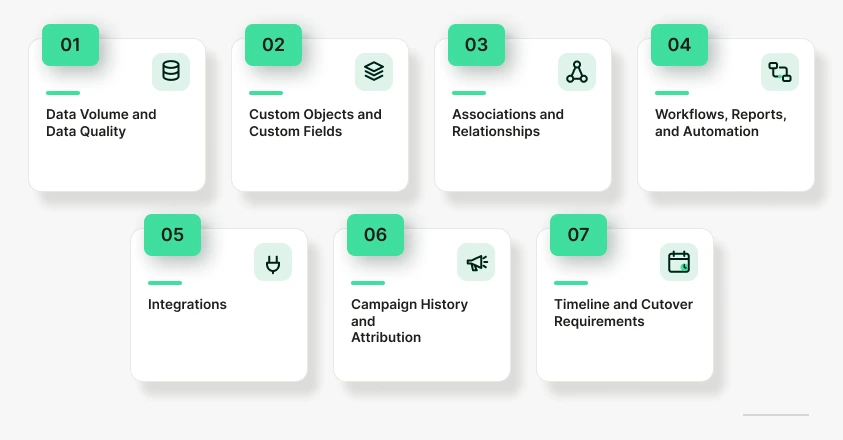
1. Data Volume and Data Quality
The number of contacts, accounts, opportunities, activities, and notes affects how long the transfer takes and how much validation is needed.
Data quality matters just as much. Duplicate records, contacts without company associations, and inconsistent picklist values all add review time. Cleaning these issues in Salesforce first is usually more cost-effective than fixing them after the data is in HubSpot. Our Salesforce to HubSpot migration checklist explains what to fix before you move.
2. Custom Objects and Custom Fields
Standard objects such as accounts, contacts, and opportunities usually map to HubSpot companies, contacts, and deals in a predictable way. Custom objects and custom fields need more planning.
Each one requires a decision. Does a HubSpot equivalent exist? Does a new property need to be created? Is the information still used? The more custom structure you have, the more time goes into field mapping and testing.
3. Associations and Relationships
Moving records is one task. Preserving how they connect is another.
Company-to-contact links, deal associations, and opportunity contact roles all need to be reviewed. Problems here may not be obvious on migration day and often appear weeks later, which is why validation effort is part of the real cost.
4. Workflows, Reports, and Automation
Salesforce workflow rules, Process Builder processes, and Flows do not automatically become HubSpot workflows. They generally need to be rebuilt or redesigned.
The same applies to reports and dashboards. The more automations and reports your team relies on, the more build and testing time your project needs.
5. Integrations
Marketing platforms, billing tools, support software, and data warehouses may all connect to Salesforce. Each integration needs to be reviewed, reconnected, or replaced, then tested after the move.
Integration-heavy environments tend to cost more because each connection adds configuration and testing work.
6. Campaign History and Attribution
If your reporting depends on campaign history and historical attribution, the migration needs extra planning to preserve it. Confirming what can transfer and what needs a separate process takes time and should be factored into your estimate.
7. Timeline and Cutover Requirements
A tight deadline, a phased rollout, or a requirement for minimal downtime can all increase effort. A longer validation period also means more support time, but it lowers risk.
Costs Beyond the Migration Itself
Many teams budget only for the data transfer and are surprised by the rest. When building your budget, include the following.
- HubSpot licenses: Your HubSpot subscription is a separate and ongoing cost. Review current HubSpot pricing for the hubs and seat levels you need, and confirm whether onboarding or implementation fees apply to your plan.
- Salesforce overlap: Keeping Salesforce active during validation means paying for both systems for a period. This is a deliberate cost that protects you from switching off too early.
- Internal team time: Admins, sales operations, marketing, and sales leaders all spend time on audits, decisions, testing, and training.
- Data cleanup: Deduplication, standardization, and archiving decisions take effort whether you do them in-house or hand them to a provider.
- Workflow and report rebuilds: Rebuilding automation and dashboards in HubSpot is often scoped separately from the data transfer.
- Integration work: Reconnecting or replacing third-party systems may involve vendor fees or developer time.
- Training and adoption: Your team needs time to learn the new CRM, and productivity may dip briefly during the transition.
- Post-migration fixes: Issues found during validation need an owner and time to resolve.
Your Options and How They Affect Cost
There are three common ways to approach the move, and each shifts cost and risk differently.
DIY Imports
Using CSV exports and HubSpot’s native import tools can work for small, simple datasets. The software cost is low, but the effort is high. You are responsible for mapping, sequencing, association handling, and validation, and mistakes can mean repeated imports.
This approach is easiest to justify when you have limited data, few custom objects, and strong in-house CRM expertise.
Migration Tools
A dedicated migration tool reduces repetitive manual work and gives you more control over what moves. Typically, you connect both CRMs, choose objects, configure record matching, map fields, and test with a sample before running the full transfer.
Migration Services
Salesforce to HubSpot migration services and broader CRM data migration services add expert planning, setup, and validation on top of the transfer. They are often a better fit for complex instances with many custom objects, integrations, and automations, or for teams without spare admin capacity.
HubSpot CRM migration services typically cost more than a tool-only approach because you are paying for people’s time and expertise. In return, you reduce the internal workload and the risk of costly mistakes.
| Approach | Upfront Cost | Internal Effort | Best For |
| DIY imports | Lowest | Highest | Small, simple datasets with strong in-house expertise |
| Migration tool | Moderate | Moderate | Teams that want control with less manual work |
| Migration services | Highest | Lowest | Complex instances or limited internal capacity |
Hidden Costs That Make Cheap Migrations Expensive
A low quote can become costly if it leaves key work out. Watch for these common gaps.
- Rework from skipped planning: If field mapping or sync order is wrong, the data may need to be corrected and migrated again. For example, HubSpot’s Salesforce sync depends on setup and sequence, not only on the data itself.
- No validation included: A migration without a comparison period leaves you finding problems after Salesforce is switched off.
- Limited association handling: Deals without the right company or contact relationships create manual cleanup later.
- Custom objects excluded: Some scopes cover only standard objects, leaving custom data for a separate project.
- Workflows and reports not covered: Data may arrive, but your team still cannot work the way it did before.
- Unclear change pricing: If the scope changes mid-project, you need to know how that is billed.
How to Estimate Your Own Budget
You can create a useful estimate before talking to any vendor.
- Take inventory: List your objects, custom objects, key fields, workflows, reports, and integrations.
- Estimate record volumes: Note the approximate number of contacts, accounts, opportunities, and activities.
- Assess data quality: Identify duplicates, unassociated contacts, and inconsistent values.
- Decide what should not migrate: Reducing scope reduces effort. Our HubSpot migration guidance and checklist can help you decide what is worth moving.
- Choose your approach: Decide whether DIY, a tool, or a service best matches your team’s capacity.
- Add the surrounding costs: Include licences, overlap, training, and internal time.
- Add a contingency: Reserve some budget for issues found during validation.
Questions to Ask Before You Request a Quote
Whether you are evaluating a tool or a provider of Salesforce to HubSpot migration services, ask the following.
- Which objects, including custom objects, are included?
- How are associations and opportunity contact roles handled?
- Is a sample or test migration included?
- How are field mapping and picklist differences handled?
- Does the scope include workflows, reports, and integrations, or only data?
- What validation and support are provided after the migration?
- How is pricing affected if the scope changes?
- Who owns each task, the vendor or your team?
Clear answers make quotes comparable and expose gaps before they turn into extra costs.
How InboundSync Helps You Control Migration Cost
A well-scoped migration costs less than one that needs repeated fixes. InboundSync helps teams connect their source and destination CRMs, select the objects they want to transfer, configure record matching, map fields, and run a sample migration before the full transfer.
Testing with a sample gives you the chance to catch mapping problems early, when they are quick to fix, instead of after the full dataset has moved. This keeps decisions about data selection and business rules with the people who understand your CRM, while reducing repetitive manual work.
To understand how this would apply to your own instance, explore our Salesforce to HubSpot migration page.
The Bottom Line
The real cost of a Salesforce to HubSpot migration depends on complexity, not just record counts. Custom objects, associations, workflows, integrations, and data quality all shape the final number, and the surrounding costs often matter as much as the migration itself.
Audit your Salesforce instance, decide what is worth moving, and choose the approach that fits your team’s capacity. Compare scope as carefully as you compare price, and leave room for validation before Salesforce is retired.
A good migration is not the cheapest one. It is the one that gives your team accurate data and working processes without expensive surprises after go-live.
FAQs
How much does a Salesforce to HubSpot migration cost?
The cost varies widely because it depends on data volume, data quality, custom objects, workflows, integrations, and the migration method. Published starting prices from providers are only entry points, and the final cost is usually confirmed after reviewing your Salesforce instance.
What affects Salesforce to HubSpot migration cost the most?
Complexity usually has more impact than record count. Custom objects and fields, associations, workflows, reports, integrations, and campaign history typically add the most effort.
Is it cheaper to migrate from Salesforce to HubSpot myself?
A DIY import has the lowest software cost, but it requires the most internal time and carries a higher risk of rework. It is most suitable for small, simple datasets and teams with strong CRM expertise.
What costs are included besides the migration itself?
Plan for HubSpot licences, a Salesforce overlap period, internal team time, data cleanup, workflow and report rebuilds, integration work, training, and post-migration fixes.
When should I use Salesforce to HubSpot migration services instead of a tool?
Migration services are usually a better fit when you have many custom objects, complex automations, several integrations, or limited internal admin capacity. A tool may be enough when your team can manage planning and validation itself.
How can I reduce the cost of my migration?
Clean and deduplicate data before exporting, decide what should not migrate, document your field mapping in advance, run a sample migration, and prioritize the workflows and reports your team actually uses.